HOW TO USE AI FOR SOCIAL MEDIA CONTENT (WITHOUT SOUNDING LIKE AI)
Artificial Intelligence (AI) is everywhere right now, especially in social media marketing and content creation, and that’s not inherently a bad thing.
AI is an incredibly powerful tool for business owners of all sizes, so the issue isn’t businesses using AI — it’s how they’re using it. A lot of brands are relying on AI to completely run their content, and the result is often the same robotic captions, generic graphics, and overly polished posts flooding every platform.
People notice that stuff immediately.
If you’re a business owner trying to improve your social media content, AI should be used to speed up workflow, reduce creative barriers, and help generate ideas — not completely replace your brand voice or creative direction. For this, the goal is simple: use AI smartly while still sounding human.
Stop Using AI Like a Copy-and-Paste Machine
One of the biggest mistakes businesses make with AI content creation is treating tools like OpenAI or ChatGPT like an instant social media manager.
They type:
“Write me a social media caption for my tire shop sale.”
Then they copy and paste the response directly into Facebook or Instagram without changing anything, which is where things fall apart. Most default AI writing is:
Too long
Full of filler
Overusing emojis
Trying too hard to sound exciting
Completely disconnected from the business itself
Customers are getting better and better at spotting AI-generated content, especially when it feels generic or forced, negatively impacting the overall purchasing experience when customers are starved for authenticity. That doesn’t mean you shouldn’t use AI for copywriting. It just means you need to guide it properly.
Teach AI Your Brand Voice
The best way to use AI for social media marketing is to treat it like a creative assistant, not a creative director. To get better results, take the time to teach it:
Your tone
Your audience
Your industry
What performs well on your pages
What kind of content you actually like
Example: You’re doing captions for a Tire Shop.
After explaining a bit about your business, as done previously, set parameters for the response. This will sound like:
“Keep it sharp and professional, limit emojis, don’t over-explain the graphic and make sure you’re being community focused and natural sounding”
That immediately gives you a better result. Instead of sounding like every other AI-generated business post online, the content starts sounding more like your business while the AI you employ will begin to pick up on your brand voice. People are craving authenticity more than ever as AI becomes more common online, so be the brand to give them what they’re looking for while also boosting your productivity.
Use AI for Graphic Design Workflow
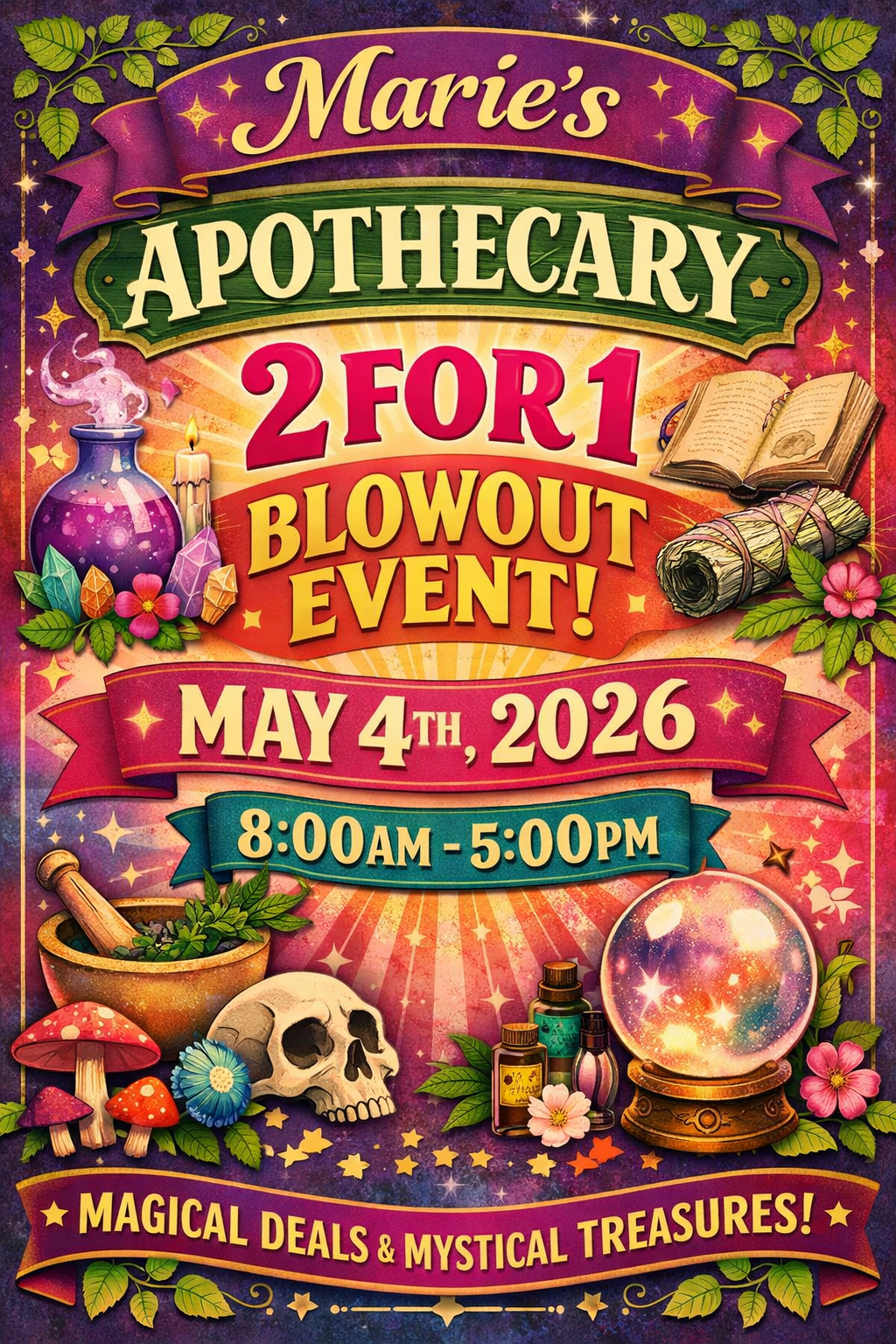
I’m sure you’ve saw something like this recently…
Creative Tool ≠ Graphic Designer
We’re currently in the heat of consumerization of Generative AI, from online memes to business flyers. Recently, online groups have went as far as rallying around how they “will not attend events if the flyer is AI slop”. You can combat this by taking advantage of one of the most underrated uses for AI, which is simply speeding up graphic design workflow. Instead of relying on an AI model to design your entire graphic, or spending forever searching for the perfect clipart or stock icon, you can instead use it to generate custom assets in seconds.
Example: Same Tire Shop, but you’re designing a flyer for tire rotations.
If you don’t have a specific vision in mind, you can call on the experience of your AI model while still laying out some design parameters. Your prompt will look something like this:
“You’re a graphic designer. You’re doing a social media graphic promoting a Tire Change package and want an eye-catching icon to use on the flyer. It should be a simple tire rotation icon, one colour and minimal detail to match the brand style of this design (insert example)”
This is where AI works best — helping you create faster while still staying in control creatively. By doing this, you’re not replacing design skills or creative authenticity, you’re simply removing some of the creative friction from the process. Just for reference, this is the icon that we got using this prompt:

Use AI to Generate Content Ideas
If you’re struggling with social media ideas for your business, AI can also be incredibly useful for brainstorming. But again, context matters.
Instead of asking:
“Give me content ideas for a tire shop.”
You’ll get much better results if you explain:
What type of posts already perform well
Whether your audience prefers video or graphics
If your town is community-focused
What your goal actually is
This is known as nurturing your AI model. In essence, the more detail you give, the more usable the future ideas become. When you give ChatGPT, Gemini or whatever AI you employ an open-ended question or request, it compiles what it deems to be the most appropriate response with no real context or parameters. By setting strict guidelines and criteria you’re looking for, as well as any backend data you may have (historic post performance, high-performing subjects, etc), you can lay the foundation to optimize future generations.
This goes for content ideas, copywriting, creative medias, etc. In order to properly leverage AI effectively, without overtly feeling like “AI slop”, you need to put in the backend work.
In Conclusion: AI Should Remove Friction — Not Personality
That’s the biggest thing to remember. Good AI usage should make content creation easier, faster, and more efficient without stripping away the human side of your business. The businesses getting the best results with AI right now are still the ones showing real people, real work, and real personality online. AI is just helping them streamline the process.
Use it to support your creativity, not replace it.